Free job application tracker template for Google Sheets and Excel (with automatic follow-up dates)
Free job application tracker template for Excel and Google Sheets, no signup. The follow-up date fills itself in and due rows turn yellow. Every formula explained.
Most job search spreadsheet templates give you the columns and leave the hard part to you: remembering, every morning, which applications are due a follow-up. This one works that out itself. You type the date you applied, and the sheet writes the follow-up date, counts the days you have been waiting and turns the row yellow when it is time to write.
It is a single .xlsx file, free and without signup. It opens in Excel and imports into Google Sheets, and every formula in it is printed below, so you can check it, change it or rebuild it in your own sheet.
Download the job application tracker template (.xlsx)
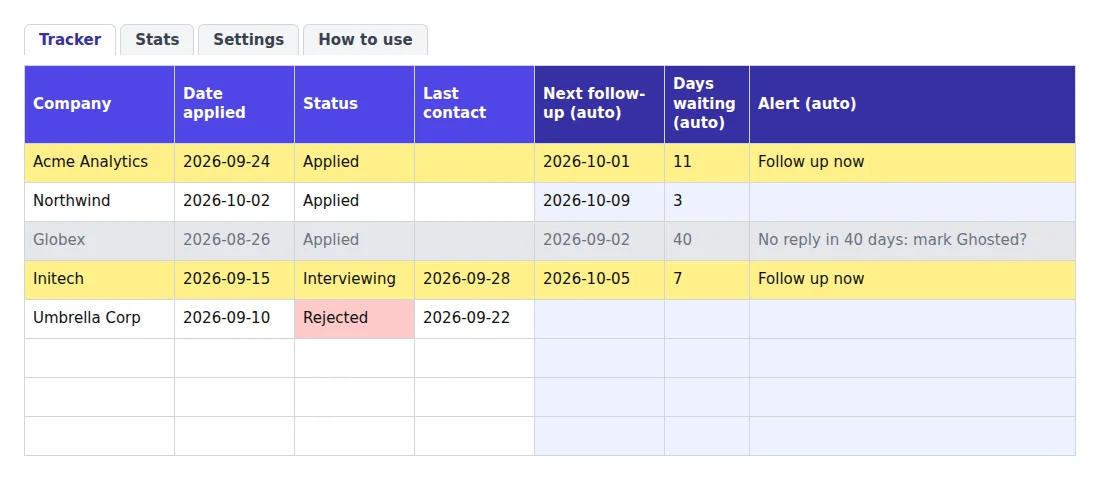
What's in the template
The file has four tabs: Tracker (one row per application), Stats (counts and response rates, calculated for you), Settings (the two delays the formulas use) and How to use.
The Tracker columns, in order:
| Column | What goes in it |
|---|---|
| Company, Role, Job link | The posting, so you can find it again before an interview |
| Date applied | The day you sent it |
| Applied via | Company website, job board, LinkedIn Easy Apply, referral, etc. |
| Status | A dropdown: Saved, Applied, Interviewing, Offer, Rejected, Ghosted |
| Contact | The recruiter or hiring manager, if you have a name |
| Resume version sent | Which tailored version went out (CS-resume-v2) |
| Last contact | The last day anything happened: a follow-up you sent, a reply |
| Next follow-up (auto) | Calculated. Do not type here |
| Days waiting (auto) | Calculated |
| Alert (auto) | Calculated: "Follow up now" or "No reply in N days: mark Ghosted?" |
| Notes | Salary range, what the recruiter said, your gut feeling |
The six statuses are the ones the HiredFolio job application tracker uses, so moving your search into the app later needs no translation. What each status means and what it asks you to do next is covered in our method for tracking job applications, along with a four-line follow-up email you can reuse. When a portal shows a label that fits none of them, our guide to job application status meanings says which one to pick.
Rows 2 to 6 are examples, dated relative to the day you open the file so you see both alerts the first time you open it. Delete them before you add your own.
Applying for internships rather than jobs? The internship application tracker template swaps the follow-up clock for countdowns to application deadlines, online assessments and offer decision dates.
The follow-up date formula
This is the column most templates leave empty. Here is the whole formula, in the simple form you can paste into any sheet where column D is "Date applied" and column I is "Last contact":
=IF(D2="","",WORKDAY(MAX(D2,I2),5))
What each piece does
IF(D2="","", …)leaves the cell blank on rows you have not filled in yet, so an empty sheet does not show 300 follow-up dates.MAX(D2,I2)picks the later of the two dates. Before you have heard anything, that is the application date. Once you follow up or a recruiter replies, you type that day in Last contact and the clock restarts from there. This is what stops the sheet from asking you to chase the same company twice in a row.WORKDAY(…,5)adds five working days. Saturdays and Sundays are skipped, so a follow-up never lands on a weekend.WORKDAYhas the same syntax in Excel and Google Sheets.
In the template, the 5 is not typed into the formula. It reads from the Settings tab (Settings!$B$3), so you change the delay once and all 300 rows follow.
Why five working days
Five working days is exactly one calendar week. There is no rule about when to follow up, but there is a survey of the people who receive the follow-ups:
65%
0% said not to follow up at all
of HR managers said to follow up within two weeks of sending a resume: 29% said less than a week, 36% said one to two weeks. A one-week delay sits between the two most common answers.
Source: Accountemps survey of 300+ HR managers at US companies, September 2017
The survey is from 2017 and covers the US only, so take it as a range, not a law. If you mostly apply through large companies' online forms, where applications can sit in a queue before anyone opens them, set the delay to 7 or 8 working days instead.
Skip public holidays too
WORKDAY takes an optional third argument: a list of dates to skip. Add a tab called Holidays, list your public holidays in column A (US federal holidays, UK bank holidays, whatever applies to the company you applied to), and change the formula to:
=IF(D2="","",WORKDAY(MAX(D2,I2),5,Holidays!A:A))
For most searches this is optional. It matters in late December: without a holiday list, a five-day delay from 22 December 2026 counts Christmas Day as a working day.
Stop the tracker nagging you about dead applications
A follow-up alert that fires on a rejected application is worse than no alert: you learn to ignore the yellow, and then you ignore the ones that count. So the template closes a row.
Which statuses switch the alert off
Three statuses close an application: Offer, Rejected and Ghosted. On a closed row, Next follow-up, Days waiting and Alert all go blank. In the template's version of the formula, that check comes first:
=IF(D2="","",IF(OR(F2="Offer",F2="Rejected",F2="Ghosted"),"",WORKDAY(MAX(D2,I2),Settings!$B$3)))
Interviewing is deliberately not closed. After an interview, the recruiter usually says when you will hear back. If that day passes in silence, a short note is the right move. Put the interview date in Last contact and the sheet reminds you five working days later.
Ghosted is a suggestion, not an automatic status
After 30 days without any activity, the row turns grey and the Alert column reads "No reply in 34 days: mark Ghosted?". The formula does not change the status for you, because a formula cannot write into another cell, and because you may know something the sheet does not (a recruiter who said "we'll decide in October").
When you agree, pick Ghosted in the dropdown. The row closes and drops out of your follow-up list. The 30 is in Settings too (Settings!$B$4).
Why suggest it at all? Because a search with 40 open "Applied" rows feels busier than it is. Moving the silent ones to Ghosted shows you how many live applications you really have, and that number is the one that tells you whether to send more.
Using the template in Google Sheets
There is no Google Sheets version to "make a copy" of: you import the .xlsx once, and from then on it is a normal Google Sheet in your Drive, editable from your phone.
Import it
- Open sheets.new to create a blank spreadsheet.
- Go to File > Import > Upload and choose the file you downloaded.
- Pick Replace spreadsheet, then Import data.
You can also upload the file to Google Drive, open it, and use File > Save as Google Sheets.
Four things to check after the import
Take thirty seconds to confirm the import kept the parts that do the work:
- The Status dropdown. Click a cell in the Status column. You should see the six statuses.
- The follow-up formula. Row 2 should show a date in Next follow-up, not an error.
- The highlight. At least one example row should be yellow and one grey.
- The Stats tab. "Applications sent" should read 5 while the example rows are still there.
If one of them failed, the formulas above let you rebuild that piece by hand. The highlight rules are in Format > Conditional formatting. They only read the Alert column of the same tab, since Google Sheets conditional formatting cannot point at another tab.
Set the locale before you type a date
Google Sheets reads the dates you type according to the spreadsheet's locale, which controls its date formatting. On a sheet set to the United States, 03/04/2026 is 4 March. On one set to the United Kingdom, it is 3 April. Check File > Settings > Locale before your first entry.
The template sidesteps most of this by showing dates as 2026-03-04 (year, month, day), which reads the same everywhere. Typing dates that way also works in every locale.
Why the yellow rows update when you open the sheet
The formulas compare dates with TODAY(), which Google Sheets recalculates when the spreadsheet recalculates (Google's documentation). In practice: open the sheet in the morning and the highlights are current. The sheet does not send you anything while it is closed. Excel works the same way, and if the dates there look stuck, check that Formulas > Calculation Options is set to Automatic (Microsoft's note on TODAY).
Using it in Excel
Open the file. That is the whole setup. Delete the example rows, keep the header, and type your first application in row 2. The Status and Applied via columns have dropdowns, the date columns refuse anything that is not a date, and the header row and Company column stay in place as you scroll.
The template has 300 rows of formulas. If you go past that, select the last filled row and drag it down: the formulas copy with it.
Your response rate, by channel
The Stats tab counts a reply as Interviewing, Offer or Rejected. A rejection counts, because someone read the application and answered. Ghosted does not. The response rate is replies divided by applications sent:
=IF(B3=0,0,B4/B3)
The useful part is the table under it: the same rate for each "Applied via" channel. If referrals answer and Easy Apply does not, you know where the next ten applications should go. A channel with three applications in it tells you nothing yet. Wait for ten or more before drawing a conclusion.
There is no benchmark in the file. We have not found a trustworthy source for a "normal" response rate, and it varies too much by field and seniority to borrow someone else's.
When a spreadsheet stops being enough
A sheet does the job as long as you open it. What it cannot do is reach you. It will not email you on the morning a follow-up is due, and every row still has to be typed or pasted from the job posting.
That is the part HiredFolio automates. The Chrome extension saves a job from LinkedIn, Indeed or a company careers page in one click (title, company, full description). The tracker uses the same six statuses as this template. When you set a follow-up date on an application, you get one email on that morning listing everything due. The free plan tracks up to 100 active applications, and archived ones do not count.
Track your applications in HiredFolio for free
If you are still deciding how you want to track your search, the spreadsheet is the right place to start. Move when typing rows becomes the chore you skip.
Key takeaways before your next application
Download the template, delete the five example rows, and log your next application the day you send it.
Each time you follow up or hear back, type that date in Last contact so the next follow-up moves on its own.
Mark grey rows as Ghosted, then check the Stats tab to see which channel actually answers.
When a follow-up comes due, use the four-line follow-up email from our tracking method.
Read next
- Job application status meanings: what Workday, LinkedIn and Indeed are actually telling you
What 'In progress', 'Under consideration', 'Not retained' and 'Response seems unlikely' really mean, who set each status, and the follow-up date to put in your tracker.
- Job application tracker: free template and a simple method
Build a job application tracker that works, so you can organise your postings, follow-ups, interviews and replies throughout your job search.
- The best free ATS resume checkers: 2026 comparison
An honest comparison of the free ATS resume checkers worth your time: what each one costs, whether you need an account, and what the score actually measures.