Internship application tracker: free Google Sheets and Excel template for the Summer 2027 GitHub lists
Free internship tracker for Excel and Google Sheets that counts down to application, online assessment and offer deadlines. Plus the Summer 2027 GitHub lists, checked.
An internship search runs on deadlines that a job search mostly does not have. A posting on a GitHub list can close a few weeks after it appears. The online assessment link that arrives two days after you apply expires in a week. An offer comes with a date by which you have to accept it, sometimes before your other applications have answered.
Most internship tracker templates are a job tracker with "internship" in the title: company, role, status, notes. This one counts down. You type the dates as they reach you, and the sheet works out which deadline matters for each row, how many days are left and which rows need you today. It is a single .xlsx file, free, no signup, and it opens in Excel or imports into Google Sheets.
Download the internship application tracker template (.xlsx)
Why an internship tracker needs deadline columns
A full-time job search is mostly about following up. An internship search has three clocks, and each one has a date someone else sets:
- The application deadline. The GitHub lists show no deadline column, and most postings there simply close. A posting you saved and did not apply to has a shelf life.
- The online assessment (OA). Many tech internships send a coding test, a HireVue or a game-based assessment after you apply, with a due date in the email. Miss it and the application is over, whatever your resume says.
- The offer decision date. Offers come with a date to accept or decline. That date often lands before other companies have replied, so it is the one you need to see coming.
The template gives each clock its own column and picks the one that applies to the row. Before you apply, it watches the application deadline. Once an OA arrives, it watches the OA. Once you have an offer, it watches the offer date.
If you searched for an "internship tracker Excel template" to log the hours an intern works, this is not that file. This one tracks internships you are applying to.
The columns
The Tracker tab has 300 rows and these columns:
| Column | What goes in it |
|---|---|
| Company, Role, Location | The posting |
| Term | A dropdown: Summer 2027, Fall 2027, Spring 2027, Winter 2027, Summer 2028 |
| Job link | The Apply link, exactly as the list gave it. It is how you find duplicates |
| Found on | Which list or channel you found it on (SimplifyJobs, speedyapply, Handshake…) |
| Work authorization flag | None, No sponsorship or US citizens only, copied from the list's 🛂 and 🇺🇸 |
| Date found | The day you saved it |
| Apply by (deadline) | Only if the posting gives one |
| Date applied | The day you submitted |
| Status | A dropdown: Saved, Applied, Interviewing, Offer, Rejected, Ghosted |
| Referral (who) | The name of the person who referred you, if anyone |
| OA due, OA submitted | The due date from the assessment email, and the day you finished it |
| Offer: decide by | The deadline on the offer |
| Next deadline (auto) | Calculated: the one date that matters for this row now |
| What's due (auto) | Calculated: Application, Online assessment or Offer decision |
| Days left (auto) | Calculated |
| Alert (auto) | Calculated: "due in 2 days", "Missed", "Saved 7 days ago", "No reply in 38 days" |
| Notes | Recruiter name, interview rounds, pay, which portal login you used |
The six statuses are the ones the HiredFolio job application tracker uses, so the rows can move into the app later without renaming anything. An online assessment is deliberately not a status: it is a step with its own due date, and a status column cannot hold a date.
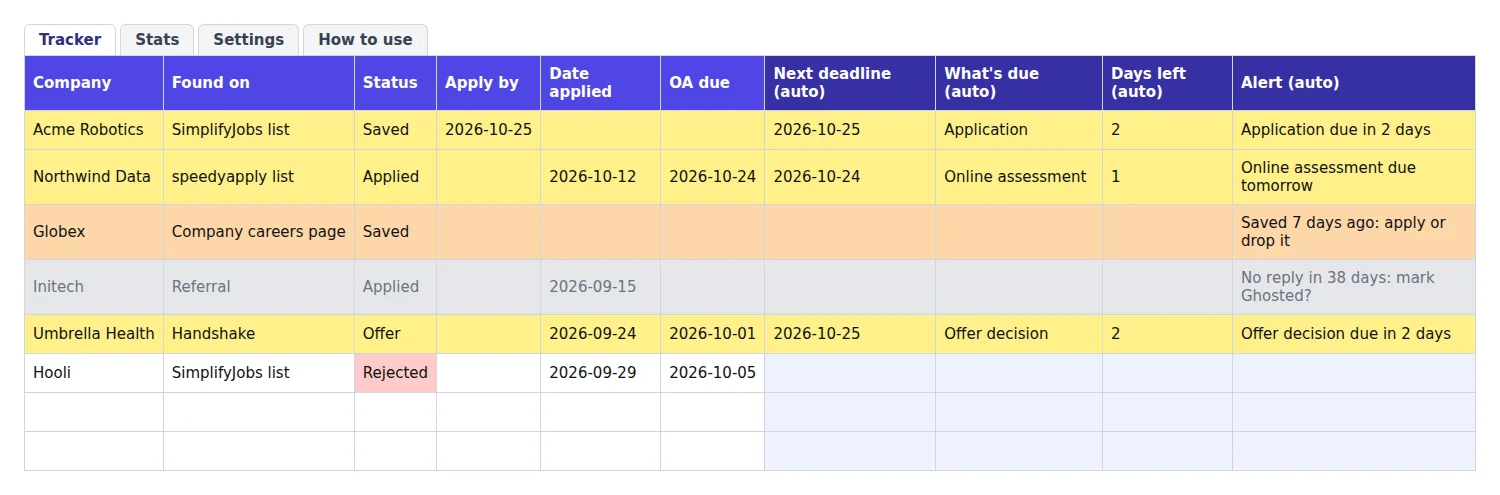
Rows 2 to 7 are examples, dated relative to the day you open the file so every alert shows the first time. Delete them before you add your own.
The formulas behind the countdown
Here is the logic, in the simple form you can paste into your own sheet. It assumes the template's columns: I is Apply by, J Date applied, K Status, M OA due, N OA submitted, O Offer: decide by.
What's due (column Q) picks the clock:
=IF(A2="","",IF(OR(K2="Rejected",K2="Ghosted"),"",
 IF(K2="Offer",IF(O2="","","Offer decision"),
 IF(AND(M2<>"",N2=""),"Online assessment",
 IF(AND(J2="",I2<>""),"Application","")))))
Read it from the top. A rejected or ghosted row has nothing due. An offer only cares about its decision date. An OA with a due date and no submission date comes next. And a deadline you typed only counts while Date applied is empty: once you have applied, the posting's deadline no longer concerns you.
Next deadline (column P) returns the matching date, and Days left (column R) is that date minus today:
=IF(Q2="","",IF(Q2="Offer decision",O2,IF(Q2="Online assessment",M2,I2)))
=IF(P2="","",P2-TODAY())
Alert (column S) checks five things in order and stops at the first that is true:
- The deadline has passed: "Missed: Online assessment".
- It is today or tomorrow: "Online assessment due tomorrow".
- It is inside the warning window (3 days by default): "Application due in 2 days". The row turns yellow.
- The row is Saved, has no Date applied, and was found 5 or more days ago: "Saved 7 days ago: apply or drop it". The row turns orange.
- The row is Applied, nothing else is due, and it has been 30 days: "No reply in 38 days: mark Ghosted?". The row turns grey.
The 3, the 5 and the 30 live in the Settings tab (Settings!$B$3 to $B$5), so you change them once for all 300 rows. The formulas use only IF, AND, OR and TODAY, and they read nothing but their own row and the Settings tab, which is what lets them survive an import into Google Sheets.
Why a saved posting goes stale in five days
The fifth check exists because saving a posting from a GitHub list feels like progress and is not. We downloaded the data file behind the SimplifyJobs Summer 2027 list on 28 September 2026 (the file was last updated on 26 September) and counted.
49%
63% of those 60+ days old
of the Summer 2027 internships posted at least 30 days before the snapshot were already marked closed. Across all 3,168 Summer 2027 listings from 701 companies, 1,019 (32%) were closed, most of them posted in August or September.
Source: HiredFolio count of SimplifyJobs/Summer2027-Internships listings.json, file dated 26 September 2026
"Closed" is the list's own flag: the maintainers mark a listing inactive when the posting stops taking applications. It is not a deadline the company announced, which is why so few rows in your sheet will have an Apply by date. For most postings on the list, the real deadline is "while it is still open", and half of them are not open a month later.
The same file shows when the postings arrive. 142 Summer 2027 internships were added in July 2026, 991 in August and 1,868 in the first 26 days of September. If you are starting in late October, the list is already long, and a good part of it is closed. Sort by newest, and apply to what is still open before saving more.
Five days is our choice, not a rule. It gives you a weekend and a few evenings to tailor a resume, and it keeps the list of saved rows short enough to act on. Set it to 3 if you apply every day.
The Summer 2027 GitHub internship lists
We checked each repository through the GitHub API on 28 September 2026. Star counts and dates will have moved since.
- SimplifyJobs/Summer2027-Internships covers SWE, data science and AI/ML, quant, product and hardware internships. Simplify and the Pitt CS Club maintain it. About 47,700 stars, last commit 28 September 2026.
- speedyapply/2027-SWE-College-Jobs covers SWE internships and new-grad roles, with separate USA and international lists and a salary column. About 9,400 stars, last commit 27 September 2026.
- vanshb03/Summer2027-Internships covers tech internships in the US, Canada and remote, maintained with the CSCareers community. About 9,100 stars, last commit 23 August 2026.
- northwesternfintech/2027QuantInternships covers quant firms only, with one table per firm and its open roles. About 2,500 stars, last commit 30 July 2026.
Two notes on that list. The vanshb03 list had not been updated for five weeks when we checked, and its newest rows were dated 21 August, so treat it as a second source, not your daily one. The quant list is organized by firm rather than by posting, so it changes less often.
If you knew the SimplifyJobs repo as "the Pitt CSC list", it is the same one. The old pittcsc repository address now redirects to SimplifyJobs.
Track in your own sheet, not in a fork
A common approach is to fork the repo and tick off rows as you apply. It breaks because the list does not keep closed postings in place. In the SimplifyJobs repo, closed roles move to a separate README-Inactive.md file, which held 1,047 rows when we checked, against 7 🔒 closed markers left in the main list. A row you ticked in your fork disappears from the main list the day the posting closes, and so does your record that you applied.
Keep your record in a sheet you own, one row per application, and copy the Job link exactly. The link, not the company name, is what identifies a posting: one company often has several internships open at once.
The same posting shows up on several lists
We compared the two lists that cover the same ground. Of the 214 Apply links in the vanshb03 list, 87 (41%) point to a posting that is also in the SimplifyJobs data file. That is a floor, since we only counted links that match exactly.
So before you add a row, search your sheet for the link (Ctrl+F or Cmd+F in both Excel and Sheets). If it is already there, you have already dealt with it. The Found on column records the list where you saw it first, and the Stats tab uses it.
Where the Apply links lead
The Apply button on a list rarely opens a simple form. Of the 2,149 open Summer 2027 postings in the SimplifyJobs file, the links went to:
| Application system | Open postings | Share |
|---|---|---|
| Workday | 830 | 38.6% |
| Greenhouse | 226 | 10.5% |
| Oracle Cloud | 203 | 9.4% |
| iCIMS | 112 | 5.2% |
| Ashby | 77 | 3.6% |
| SmartRecruiters | 37 | 1.7% |
| Lever | 24 | 1.1% |
| Other or company-built | 640 | 29.8% |
Workday is the one that shapes your week. Each company runs its own Workday site, so each one asks you to create an account, often with a password you will need again for the OA or the offer. Write the email you signed up with in the Notes column. When a recruiter says "check the candidate portal" three weeks later, you will know which login to try.
Using the template in Google Sheets
There is no "make a copy" link: you import the .xlsx once, and from then on it is a normal Google Sheet in your Drive.
- Open sheets.new.
- Go to File > Import > Upload and choose the downloaded file.
- Pick Replace spreadsheet, then Import data.
Then check that the Status dropdown, the yellow rows and the Stats tab came through. Our job application tracker template guide has the full four-point check, and explains the locale setting that decides whether 03/04/2027 means March or April. This template avoids the question by showing every date as 2027-03-04.
The countdown uses TODAY(), which updates when the sheet recalculates. Open the sheet each morning and the alerts are current. The sheet does not message you when it is closed.
What the Stats tab tells you
The Stats tab counts the applications you have sent, the online assessments you received, and the replies. A reply is an interview, an offer or a rejection; silence is not a reply. From those it calculates two rates:
- OA rate. Assessments received divided by applications sent. For SWE internships the OA is often the first filter, so a low OA rate points at the resume first: you were screened out before any test.
- Response rate by source. Replies divided by applications, for each "Found on" value. If referrals get replies and a list does not, you know where your next ten applications should come from.
Neither rate means much before about ten applications in a group. There is no benchmark in the file: we have not found a trustworthy published figure for internship response rates, and they vary too much by field and school to borrow one. Our article on how many applications it takes to get a job shows how to work out your own.
When the spreadsheet stops keeping up
A sheet works as long as you type every row. Working from the GitHub lists, that is dozens of rows a week, each one a posting you have to copy from a Workday or Greenhouse page.
That copying is what the HiredFolio Chrome extension removes. It recognizes job pages on Workday, Greenhouse, Lever, Ashby, SmartRecruiters and several other application systems. In the SimplifyJobs data above, those systems covered 1,218 of the 2,149 open postings (57%). On other sites, such as an Oracle Cloud or iCIMS portal, you allow it on that site once and it tries to read the posting from there. One click saves the title, company, link and full description into your tracker.
In the tracker you set a deadline on each application and it shows on the card, in amber while it is still ahead. Set a follow-up date and you get one email that morning with everything due. The statuses are the same six as this template. The free plan tracks up to 100 active applications, and archived ones do not count.
Track your internship applications in HiredFolio for free
If you are sending your first ten applications, start with the sheet. Switch when copying rows from the lists becomes the part you skip.
Key takeaways before you open the lists again
Download the template, delete the six example rows, and log every posting with its exact Apply link and the day you found it.
Type the OA due date the day the assessment email arrives, so the row turns yellow before it expires.
Clear the orange rows each week: apply, or delete the row. Half of the postings a month old are already closed.
No reply to an application you care about? Send one of our follow-up emails.
Read next
- Is December a bad time to job hunt? What the hiring data shows, plus a 6-week holiday plan
Month-by-month BLS and Indeed data on what happens to hiring from November to January, which weeks are really dead, and a week-by-week plan anchored to Christmas.
- The French CV format: what to change when you apply for a job in France, with a full example
Photo, one page, Bac+5, CEFR levels, the cover letter: what a US resume or UK CV must become to work in France, with a full annotated French CV example.
- How to see your applied jobs on LinkedIn, and what to do when the list disappears
Where LinkedIn keeps the jobs you applied to, why one can be missing from the Applied tab, the one-year limit, and how to download your full application history.